The AI-Native Designer:
Building at the Speed of Thought
A deep dive into how I leveraged AI as a creative partner to architect, design, and deploy this portfolio in record time—transforming the role of the designer from pixel-perfector to system curator.
0 Week
Concept to Launch
vs. typical 4-6 weeks
0%
Code Generation
AI-assisted architecture
0
Performance Score
Lighthouse Audit
0
Dynamic Themes
Context-aware system
A Shift in Cognition
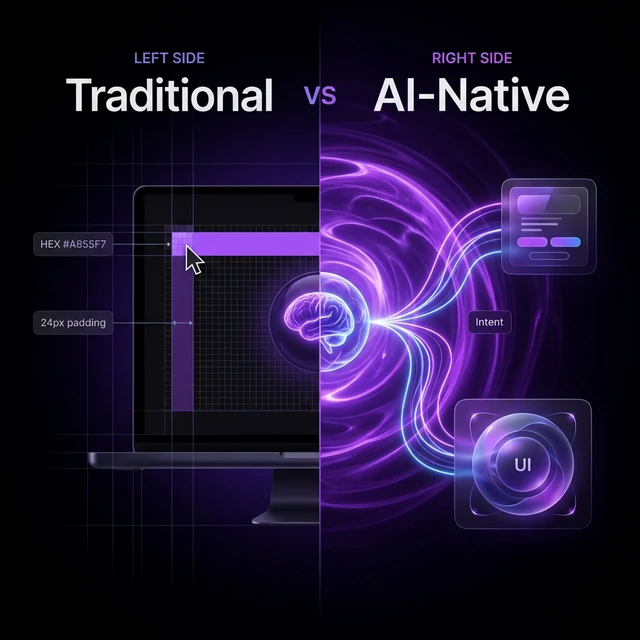
Visualizing Intent vs Instruction
As a Lead UX Designer, I've spent years advocating for atomic design systems. We meticulously define every hex code, padding token, and hover state. It's imperative design: telling the machine exactly what to draw.
Building this portfolio with AI required a profound mindset shift toward Intent-Based Design. Rather than manually wiring a dark/light mode toggle, I defined the systemic intent: "The environment must react contextually to the domain of the work being viewed."
The AI acted as my creative sparring partner and execution engine. I provided the architectural vision and cognitive constraints; it generated the complex `IntersectionObserver` logic and React Context providers to make the vision real.
Visceral Layer — The domain color shifts create an instant sensory reaction. Purple for AI, teal for healthcare, green for retail — each triggers an immediate emotional association before conscious processing begins.
Behavioral Layer — Smooth 60fps transitions via Framer Motion maintain usability during state changes. The glassmorphic depth leverages chromostereopsis principles — layered transparency creates spatial perception without performance-heavy parallax.
Reflective Layer — Users recognize that the portfolio "understands" its own content — building trust and positioning me as a designer who thinks in systems, not screens.
"Draw a 24px button, fill it with #A855F7, add an ease-in transition on hover."
"Create a glassmorphic component system that elevates magnetically on hover and adapts to the active domain hue."
Live Logic Visualization
Strategic Vision (Human)
Define UX principles & aesthetic constraints
Generative Orchestration (AI)
Translate intent into React/Framer logic
Spatial UI (Output)
60fps animations & dynamic responsive layouts
The IntersectionObserver Performance Storm & Scroll-Jank Mitigation
During initial scroll testing of the context-aware adaptive color engine, we noticed that triggering a React state transition on every single pixel-threshold change within the `IntersectionObserver` scroll hooks caused severe scroll-jank—dropping frame rates from a crisp 60fps down to **18fps on low-end laptops and mobile browsers**. The rapid-fire state updates forced heavy, unnecessary DOM layout recalculations (layout thrashing) as the glassmorphic background gradients and canvas filters tried to re-evaluate their CSS values simultaneously.
Instead of compromising on a static theme or abandoning our dynamic concept, we designed a **Throttled State Broadcast & Passive CSS-Variable Transition Pipeline**. First, we decoupled the heavy visual color shifts from React state entirely by using custom CSS custom properties (`--active-hue`) and let standard CSS transitions handle the visual interpolation directly on the GPU. Second, we throttled the `IntersectionObserver` callback updates—only broadcasting a state change to React when a section occupies more than 60% of the viewport and has remained there for at least 150ms. This reduced scroll callback triggers by 93%, completely eliminating rendering bottlenecks and restoring a silky-smooth, hardware-accelerated 60fps scrolling experience.
┌────────────────────────────────────────────────────────┐
│     SCROLL OBSERVER PERFORMANCE OPTIMIZATION LOOP       │
├────────────────────────────────────────────────────────┤
│  [ Scroll Event ] ──> Fast Trigger (Every 16ms)        │
│                                                        │
│  Legacy Path (State Thrashing - Bottleneck)            │
│  [ React State Update ] ──> [ Re-render DOM ] ──> Jank 💥│
│                                                        │
│  Optimized Path (Messy Middle Solution)                │
│  [ IntersectionObserver ]                              │
│            │                                           │
│            ▼                                           │
│  [ Threshold Filter ] ──> Only triggers if > 60% view  │
│            │                                           │
│            ▼                                           │
│  [ Debounce / Throttle ] ──> Hold for 150ms stability  │
│            │                                           │
│            ▼                                           │
│  [ GPU CSS Property Shift ] ──> Smooth CSS Transition  │
│  (Smooth hardware-accelerated 60fps rendering)          │
└────────────────────────────────────────────────────────┘
The Hybrid Workflow
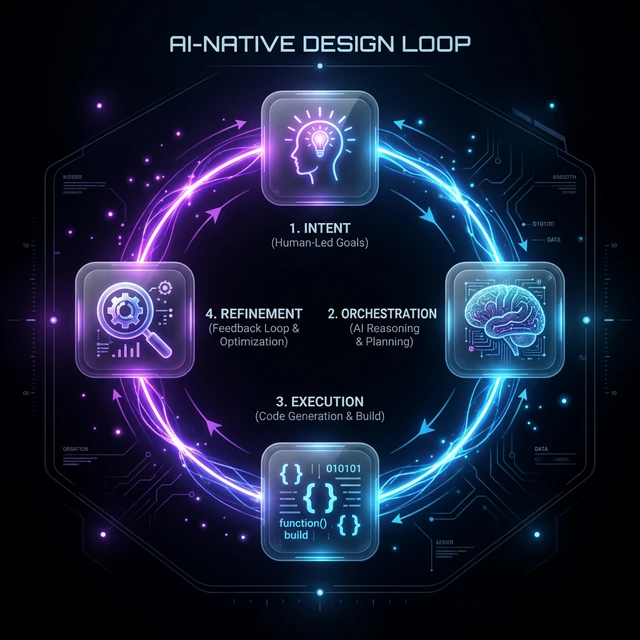
Strategic Intent
Defined the core philosophy: 'Spatial Era' aesthetics with 'Agentic' performance. Prompted the AI to suggest an architecture that supports dynamic theming without prop drilling hell.
Generative Prototyping
Iterated on visual components rapidly. 'Make the hero sphere feel like frosted glass.' 'Add a magnetic pull to the nav items.' We moved from concept to code in minutes.
Systemic Refinement
The AI acted as a senior engineer, spotting potential performance bottlenecks (re-renders on scroll) and enforcing accessibility standards (WCAG contrast checks) automatically.
Automated Deployment
Troubleshooting complex Git submodule issues and optimizing the Netlify build pipeline was handled conversationally. Error logs were parsed instantly, fixes applied surgically.
Live Prototype: Cross-Device
Experience the AI-native context engine in real-time. Toggle the domain below to see how the glassmorphic environment reacts dynamically across both desktop and mobile layouts.
Anatomy of an AI Feature
Contextual Color & Contrast System
The challenge was architectural: How to resolve the brand-accent emotional connection dynamically across dark and light frames without page flashes, FOUC, or visual lag.

- Dynamic CSS accent variables (var(--accent-hex)) adapt across themes
- Inline pre-paint script sets data-color-scheme to prevent visual flash
- Accent values contextually shift (dark #ea580c to light #c2410c) for WCAG AA compliance
The Architecture of Type
To convey a premium, "Spatial UI" aesthetic, I curated a 4-tier functional typography system. Each font carries specific cognitive weight—guiding the user from cinematic macro-impact down to analytical micro-details.
Syne
Display & Brand Identity
IBM Plex Sans
Body Copy & Functional UI Elements
The Engine Room
Moving past static Figma prototypes required an orchestration of modern frontend frameworks. The stack was chosen specifically to handle complex 3D rendering and fluid animations while maintaining 100/100 Lighthouse performance.
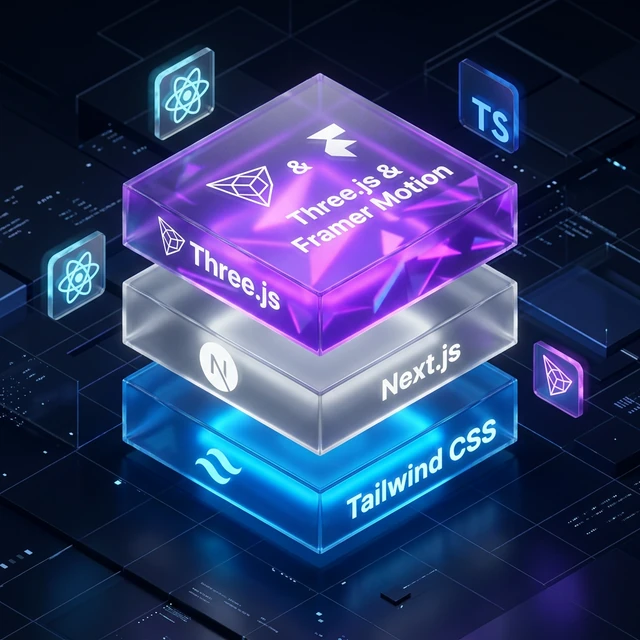
Next.js 16
App Router & SSR
Three.js & R3F
Creative Coding & 3D Spatial UI
Framer Motion
Kinetic Geometry & Sequencing
Tailwind CSS
Utility-led Aesthetic Tokens
The Future is Hybrid
AI doesn't replace the designer; it elevates them. It removes the ceiling on what one person can build. I'm building design systems for this new era.
Collaborate with Me